Sheet Music to MIDI on 1,000 Test Pages — Enhanced vs Standard
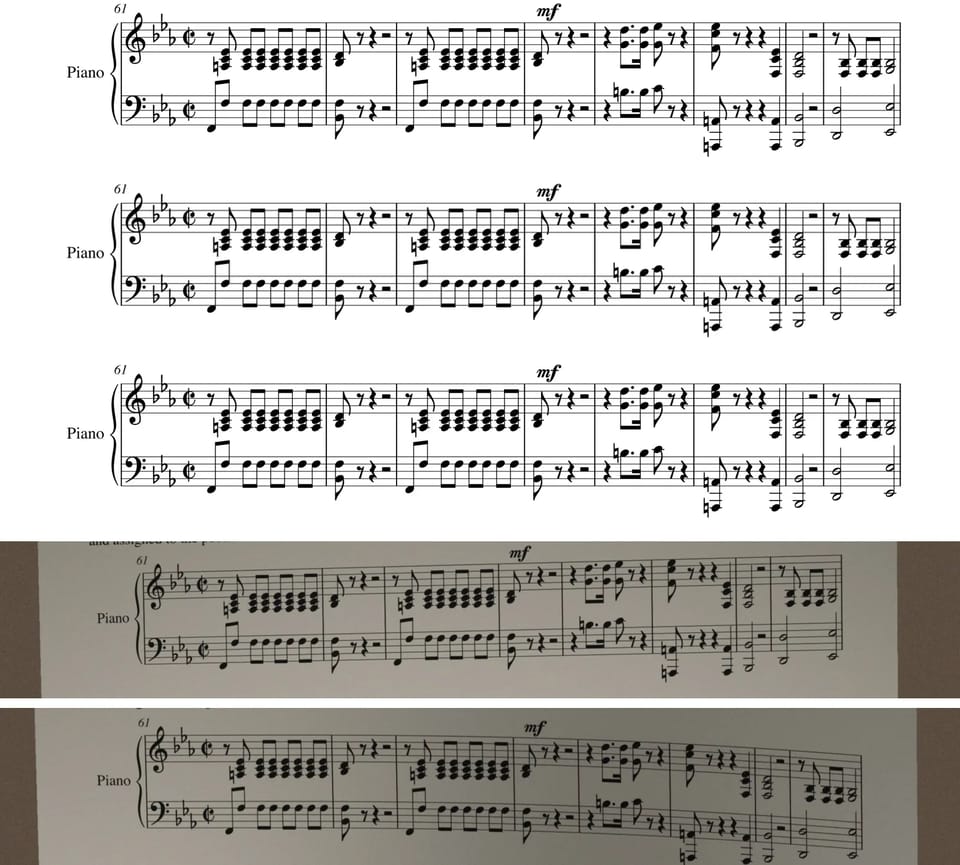
Enhanced transcription is an optional mode in Lacuna's sheet music to MIDI converter: a slower second read of every page, measure by measure, after standard mode has returned its result. To see what it changes, we built a benchmark of 1,000 pages: 200 one-page excerpts from public-domain works, each turned into five images — a clean 300 DPI page, a 150 DPI scan, a page with faded staff lines, a simulated phone photo, and a simulated photo of a curved page. Together the pages hold 339,065 notes in 28,245 measures, and every one has an exact reference to score against.
Both modes read all 1,000 pages. On a 100-point scale, where 100 means the result matches the reference note for note, Enhanced transcription had a median of 98.8; standard mode had 82.1. Enhanced scored 98 or higher on 602 of the 1,000 pages, standard mode on 119. The gap was widest on the curved pages, where standard mode's median fell to 14.6 and Enhanced's was 98.2.
What Enhanced transcription does
Standard mode reads each page once and returns its result first. Enhanced transcription then reads each selected page again, measure by measure, and replaces the standard result for that page when it finishes. It takes longer and costs extra credits, so it is a choice you make per upload or per page, not the default.
- Two ways to start it. Turn it on when you upload, or pick pages to enhance on a transcription that has already finished.
- Priced per page. Each page is priced by the number of notes on it. The price and an estimated wait for every page are shown before you confirm.
- The standard result stays. It remains available while the enhanced pages run, and you can leave the page. If a page does not finish, its standard result is kept and the credits for enhancing that page are refunded.
How we built the benchmark
200 excerpts from 193 works by 37 composers. Most come from the OpenScore Lieder Corpus, a collection of art songs, mostly from the 19th and early 20th centuries, released into the public domain; the rest come from the music21 corpus. Each excerpt is one page, usually the first page of the piece. Some are the full score; others keep one part, such as the piano part or the vocal line of a song, so that each instrumentation is well represented:
| Instrumentation | Excerpts | Pages | Median notes per page |
|---|---|---|---|
| Single line (voice, clarinet, lead sheet) | 41 | 205 | 102 |
| Choir (three to five voices, with or without piano) | 18 | 90 | 244 |
| Voice and piano | 62 | 310 | 337 |
| Piano | 58 | 290 | 479 |
| Chamber ensemble (string quartets, trios, mixed groups) | 21 | 105 | 272 |
The pages range from 37 to 1,374 notes, with a median of 291.
Five images of every page. Each excerpt was engraved from its human-encoded edition with Verovio, an open-source engraving library, on an A4 page. Music fonts and note spacing were varied across excerpts so the pages do not all look alike. Each page was then saved in five versions:
- Clean: 300 DPI.
- 150 DPI: the same page at half the resolution, about the quality of a low-resolution scan.
- Faded staff lines: staff lines printed in light gray with the notes unchanged, as on some web printouts and low-quality exports.
- Simulated phone photo: the page on a dark tabletop with a slight perspective tilt (each corner moved by up to 3% of the page size), uneven warm lighting, mild blur, sensor noise, and JPEG compression.
- Simulated curved page: the photo, plus a bend across the width of the page, so the staff lines arch instead of running straight.
Because every image is rendered from a known encoding, the reference is exact: it is the notes of the edition the page was engraved from. The photos are simulations. A real camera photo can add problems they do not, such as shadows, a book's gutter, or cropped edges.
How a page is scored. We compare the result with the reference one measure at a time. Within a measure, notes from all voices are put in order of onset and pitch, and a note matches only when both its pitch and its written duration match. The note score is 100 × (1 − the number of edits needed to turn the result into the reference ÷ the number of notes compared). Missing or extra measures count as entirely wrong. A score of 100 means no differences; 98 means roughly two edits per hundred notes.
Pages we replaced. After the first run, we checked every reference against its printed page and found 11 excerpts that could not be compared fairly: nine used tremolo shorthand, which the reference stores as one long note while the page shows repeated notes; one had notes hidden on the page but present in the reference; and one had note lengths in the reference that disagreed with the printed notes. We replaced their 55 pages with 11 excerpts of the same instrumentation that passed the same check. The replaced pages are not in any number in this article; on them, Enhanced averaged 77.7 and standard mode 53.0.
Each page was processed once by each mode.
Results by image condition
| Condition | Enhanced: mean / median | Standard: mean / median | Pages ≥ 98 (Enhanced / standard) | Measures with no differences (Enhanced / standard) |
|---|---|---|---|---|
| Clean, 300 DPI | 97.8 / 99.1 | 86.1 / 93.5 | 137 / 50 | 4,991 / 4,048 |
| Faded staff lines | 97.4 / 98.9 | 83.8 / 92.5 | 127 / 41 | 4,962 / 3,892 |
| 150 DPI | 96.5 / 99.1 | 76.0 / 84.1 | 129 / 14 | 4,819 / 3,158 |
| Simulated phone photo | 96.1 / 98.2 | 72.8 / 81.7 | 104 / 14 | 4,675 / 3,030 |
| Simulated curved page | 95.3 / 98.2 | 17.7 / 14.6 | 105 / 0 | 4,712 / 558 |
Each condition has 200 pages and 5,649 measures.
Standard mode lost ground with every step away from a clean page: its mean fell from 86.1 on clean pages to 72.8 on flat photos and 17.7 on curved ones, where none of its 200 pages reached 98. Enhanced transcription lost much less. Its mean on curved pages, 95.3, was higher than standard mode's mean on the clean originals of the same pages.
Results by instrumentation
| Instrumentation | Pages | Enhanced: mean / median | Standard: mean / median | Pages ≥ 98 (Enhanced / standard) | Measures with no differences (Enhanced / standard) |
|---|---|---|---|---|---|
| Single line | 205 | 98.7 / 100 | 69.3 / 86.3 | 164 / 41 | 8,315 / 5,614 of 8,520 |
| Choir | 90 | 97.0 / 99.1 | 67.4 / 83.0 | 57 / 19 | 1,446 / 752 of 1,635 |
| Voice and piano | 310 | 97.0 / 98.5 | 66.5 / 81.0 | 189 / 17 | 5,279 / 2,777 of 6,445 |
| Piano | 290 | 95.3 / 97.5 | 66.4 / 80.9 | 131 / 27 | 7,443 / 4,543 of 9,340 |
| Chamber ensemble | 105 | 94.6 / 99.3 | 67.9 / 83.3 | 61 / 15 | 1,676 / 1,000 of 2,305 |
Single lines were the easiest for Enhanced transcription: 131 of those 205 pages came back with no differences at all. Piano was the hardest, with the most notes per page. The chamber ensemble pages split in two: most scored very high, giving the group the highest median, but a few dense string-quartet pages scored low enough to pull its mean to the bottom of the table.
How often each mode came close
The averages hide how differently the two modes spread out. Counting pages by score:
| Note score | Enhanced | Standard |
|---|---|---|
| 100 (no differences) | 309 | 41 |
| 99 to below 100 | 162 | 38 |
| 98 to 99 | 131 | 40 |
| 95 to 98 | 198 | 98 |
| 90 to 95 | 110 | 156 |
| 80 to 90 | 65 | 149 |
| 50 to 80 | 24 | 193 |
| Below 50 | 1 | 285 |
Standard mode scored below 50 on 285 pages, 191 of them curved pages. On those same 285 pages, Enhanced averaged 95.8 (median 98.4), and 220 of them reached 95 or higher. Page by page, Enhanced scored more than 2 points higher than standard mode on 791 pages, within 2 points on 176, and more than 2 points lower on 33.
What Enhanced transcription still gets wrong
Across the 1,000 pages, Enhanced transcription left 14,802 differences in 339,065 reference notes, about one in 23:
- 9,131 notes at the wrong pitch. 6,193 of them were one or two semitones off, the size of a notehead read one line or space off or a missed accidental. 100 were an octave off.
- 2,753 missing notes and 1,559 extra notes.
- 1,359 notes with the wrong length.
The differences sat in a minority of measures rather than spreading across each page: 85.5% of measures came back with no differences, against 52.0% for standard mode. A check of the busiest measures and the chords catches most of what is left.
Results on seven real-world problem pages
Separately from the benchmark, we ran seven real-world pages of the kinds standard mode handled worst, 1,087 notes in total. We do not show these pages and report only their scores.
| Page type | Notes | Standard | Enhanced | Enhanced time |
|---|---|---|---|---|
| Renaissance polyphony, six voices | 114 | 4.4 | 95.6 | 2.5 min |
| Piano score with lyrics printed between the staves | 144 | 16.7 | 100 | 4.4 min |
| Low-resolution scanned PDF | 167 | 31.0 | 98.8 | 2.1 min |
| Frequent clef changes, including an octave clef | 122 | 54.9 | 100 | 3.9 min |
| Voice and piano, phone screenshot | 199 | 64.7 | 98.0 | 3.0 min |
| Five-part choir | 89 | 100* | 100 | 1.6 min |
| Piano | 252 | 100 | 100 | 2.9 min |
* Standard mode got every note on the choir page but split its five voices into nine parts, which the note score does not count.
Across the seven pages, standard mode averaged 53.1 and Enhanced 98.9.
How long it takes
Processing time grows with the number of notes on the page and with how degraded the image is. The 1,000 benchmark pages ran many at a time on shared test hardware, so their times are not representative. These times come from test runs that processed one page at a time:
- The seven real-world pages, 89–252 notes each, took 1.6 to 4.4 minutes each.
- Eight benchmark pages of 254–804 notes, as photos and curved photos, took 3.8 to 11.5 minutes each. A full page of dense piano writing, at 804 notes, took 10.6 minutes as a photo and 11.5 minutes curved.
These times come from test runs and will vary with load. In the product, each page's estimated wait is shown before you confirm.
When to use it
The gains were largest where standard mode lost the structure of the page: curved or photographed pages, low-resolution scans, choirs and other multi-part pages, and dense piano writing. Where standard mode's result already matched the page, Enhanced had little to add.
A practical order: run standard mode first, compare a few measures of the result with the page, and enhance the pages that are missing notes or measures, or whose voices came out merged or split. Enhanced transcription is available in the sheet music to MIDI and PDF to MIDI tools.